QuickBooks is a popular accounting software. It’s designed for small business owners.
This review will help you understand its features and benefits. Managing finances is crucial for any small business. QuickBooks aims to simplify this task. It offers tools for invoicing, expense tracking, and payroll. But, is it the right fit for you?
In this post, we’ll dive into a detailed review of QuickBooks. We’ll explore its pros and cons, ease of use, and pricing. By the end, you’ll know if QuickBooks can meet your business needs. Stay tuned for an in-depth look at how QuickBooks can help streamline your financial management.
Credit: quickbooks.intuit.com
Introduction To Quickbooks
Choosing the best small business accounting tools, QuickBooks stands out as a popular choice. Trusted by many, it offers a range of features designed to streamline financial management. Let’s dive into an introduction to QuickBooks and explore how it can benefit small business owners.
What Is Quickbooks?
QuickBooks is a software solution that helps manage accounting tasks. It is developed by Intuit and provides tools for invoicing, payroll, and expense tracking. The software is available in both desktop and online versions, catering to different business needs.
Key Features of QuickBooks:
- Invoicing: Create and send professional invoices.
- Expense Tracking: Monitor and categorize expenses.
- Payroll: Manage employee payments and tax filings.
- Reporting: Generate financial reports with ease.
- Integration: Sync with other business tools and apps.
Target Audience
QuickBooks is designed for small to medium-sized businesses. It is ideal for those who need a simple yet powerful accounting solution. Business owners, accountants, and bookkeepers can all benefit from its features.
Who Should Use QuickBooks?
- Small Business Owners: Manage finances without hiring an accountant.
- Freelancers: Keep track of income and expenses effortlessly.
- Accountants: Provide better service to clients with detailed reports.
- Bookkeepers: Simplify day-to-day accounting tasks.
QuickBooks offers various plans to suit different business sizes and needs. From start-ups to established businesses, there’s a plan for everyone.
QuickBooks Plans:
| Plan | Features | Best For |
|---|---|---|
| Simple Start | Basic accounting tools | Sole proprietors |
| Essentials | Additional invoicing and time tracking | Growing businesses |
| Plus | Advanced reporting and inventory | Small businesses |
| Advanced | Custom features and dedicated support | Medium-sized businesses |

Credit: m.youtube.com
Key Features
QuickBooks is a popular choice among small business owners. Its user-friendly interface and robust features streamline business operations. Let’s explore its key features that can help manage your business efficiently.
Invoicing
QuickBooks makes invoicing a breeze. With just a few clicks, you can create professional invoices. Customize them with your logo and colors. Send them directly to clients via email. Track when your clients view and pay their invoices. QuickBooks also offers automatic reminders for overdue invoices. This ensures you get paid on time.
Expense Tracking
Managing expenses is crucial for any small business. QuickBooks simplifies expense tracking. Connect your bank and credit card accounts. QuickBooks automatically imports transactions. You can categorize expenses for better insights. Snap photos of receipts and attach them to transactions. This keeps your records organized. Generate detailed expense reports to analyze your spending patterns.

Payroll Management
QuickBooks offers payroll management tools. Easily calculate and pay employee wages. Handle tax deductions and filings automatically. QuickBooks keeps you compliant with tax regulations. Employees can access their pay stubs and tax forms online. You can also manage benefits and track employee time. This ensures accurate payroll processing.
These are just a few of the key features QuickBooks offers. It provides a comprehensive solution for small business owners. Efficiently manage invoicing, expense tracking, and payroll with ease.
Pricing Plans
Choosing the right QuickBooks pricing plan is crucial for small business owners. QuickBooks offers several plans tailored to different business needs. Here’s a breakdown of the available plans and their features.

Self-employed Plan
The Self-Employed Plan is designed for freelancers and independent contractors. It helps track expenses, mileage, and income. This plan is cost-effective and offers basic features.
- Track income and expenses
- Capture and organize receipts
- Estimate quarterly taxes
- Run basic reports
- Send invoices
Simple Start Plan
The Simple Start Plan is perfect for new small businesses. It offers essential features to manage your business finances.
- Track income and expenses
- Send custom invoices and quotes
- Connect bank accounts
- Track sales and sales tax
- Manage cash flow
Plus Plan
The Plus Plan is ideal for growing businesses. It includes all features of the Simple Start Plan plus additional tools to manage projects and inventory.
| Feature | Details |
|---|---|
| Track income and expenses | Yes |
| Send custom invoices and quotes | Yes |
| Connect bank accounts | Yes |
| Track sales and sales tax | Yes |
| Manage projects | Yes |
| Track inventory | Yes |
Advanced Plan
The Advanced Plan is for larger small businesses with complex needs. It includes all features from the Plus Plan and provides advanced tools for managing your business.
- Dedicated account manager
- Advanced reporting and insights
- Batch invoices and expenses
- Advanced user roles and permissions
- Business analytics and insights
Each plan has unique features to meet different business needs. Choose the one that best suits your business requirements.
Ease Of Use
For small business owners, finding software that is easy to use is key. QuickBooks is known for its simplicity and user-friendly design. This makes it popular among small businesses. Let’s explore its user interface and setup process to see why it stands out.
User Interface
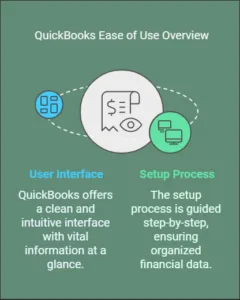
QuickBooks offers a clean and intuitive user interface. The dashboard presents vital information at a glance. You can see your sales, expenses, and profit margins easily. Navigation is straightforward, with clear labels and icons. This reduces the learning curve for new users.
For more advanced features, the menus are well-organized. You can access reports, customer information, and invoices without hassle. The use of color coding helps in distinguishing different sections. This ensures you can find what you need quickly.
Setup Process
Setting up QuickBooks is a breeze. The software guides you step-by-step through the process. This helps in entering your business details, linking bank accounts, and setting up invoices.
Here’s a quick overview of the setup steps:
- Enter your business information.
- Connect your bank accounts.
- Set up your chart of accounts.
- Create and customize invoices.
- Add customers and vendors.
Each step is explained clearly, ensuring you don’t miss anything. The initial setup might take some time, but it’s worth it. Your financial data will be organized from the start.
QuickBooks also offers setup support. You can access tutorials and customer service if needed. This ensures that even those not tech-savvy can get started without frustration.
Overall, QuickBooks excels in ease of use. Its user interface is designed for simplicity, and the setup process is straightforward. These features make it an excellent choice for small business owners.
Integration Capabilities
QuickBooks offers powerful integration capabilities that make managing your business easier. From linking with third-party apps to secure bank connections, these features streamline your workflow. Small business owners benefit from seamless data flow across platforms, saving time and reducing errors.

Third-party Apps
QuickBooks integrates with numerous third-party apps to extend its functionality. These apps cover various needs:
- Project management
- Customer relationship management (CRM)
- Inventory management
- eCommerce
For instance, QuickBooks connects with Shopify for your online store. It syncs sales data, inventory, and customer information. This integration reduces manual data entry and errors.
Another popular app is HubSpot. It helps manage customer interactions and sales pipelines. The integration with QuickBooks ensures your customer data and financials are always up-to-date.
Bank Connections
QuickBooks provides secure bank connections. These connections allow automatic import of your bank transactions. This feature ensures your financial records are accurate and current.
Setting up a bank connection is simple. Follow these steps:
- Go to the Banking menu.
- Select ‘Add account’.
- Search for your bank.
- Enter your bank credentials.
Once connected, QuickBooks will download your recent transactions. You can categorize and match them to your existing records. This process saves time and minimizes errors.
QuickBooks supports connections with major banks like:
- Bank of America
- Chase
- Wells Fargo
- Citibank
These integrations make bank reconciliation straightforward. Your books stay accurate, and you can focus on growing your business.
Credit: quickbooks.intuit.com
Customer Support
Customer Support is crucial for small business owners using accounting software. QuickBooks understands this and provides excellent customer support to help you manage your finances efficiently. Let’s explore the different support channels and response times offered by QuickBooks.
Support Channels
QuickBooks offers multiple support channels to assist you with any issues. You can choose the one that best suits your needs.
- Phone Support: Speak directly with a support representative.
- Email Support: Send detailed queries and receive responses via email.
- Live Chat: Get instant help through live chat on the QuickBooks website.
- Community Forum: Access a vast community of users and experts.
- Help Center: Browse articles, tutorials, and FAQs.
Response Time
The response time varies based on the support channel you choose. QuickBooks aims to provide timely assistance to minimize disruptions in your business operations.
| Support Channel | Average Response Time |
|---|---|
| Phone Support | Within 5-10 minutes |
| Email Support | Within 24 hours |
| Live Chat | Instant |
| Community Forum | Varies, usually within a few hours |
| Help Center | Immediate access to resources |
QuickBooks strives to provide swift and helpful support, ensuring your business runs smoothly with minimal downtime.
Pros And Cons

Choosing the right accounting software is crucial for small business owners. QuickBooks offers many features, but it also has its downsides. Understanding the pros and cons can help you decide if QuickBooks is the right tool for your business.
Advantages
QuickBooks provides several benefits that make it a popular choice.
- Easy to Use: The interface is user-friendly and simple.
- Comprehensive Features: It offers invoicing, payroll, and expense tracking.
- Cloud-Based: Access your data from anywhere, anytime.
- Integration: Connect with third-party apps like PayPal and Shopify.
These advantages make QuickBooks a versatile tool for small businesses.
Disadvantages
There are some drawbacks to using QuickBooks as well.
- Cost: Monthly subscription fees can add up.
- Complexity: Advanced features may require training.
- Customer Support: Users report mixed experiences with support.
- Limited Customization: Some features lack flexibility.
These cons might affect your decision to use QuickBooks.
Frequently Asked Questions
What Are The Key Features Of Quickbooks?
QuickBooks offers invoicing, expense tracking, payroll, and financial reporting. It supports integrations and has a user-friendly interface.
Is Quickbooks Suitable For Small Businesses?
Yes, QuickBooks is ideal for small businesses. It helps manage finances, invoices, and expenses efficiently.
How Much Does Quickbooks Cost?
QuickBooks pricing starts at $25 per month. Costs vary based on selected features and subscription plans.
Can Quickbooks Integrate With Other Software?
Yes, QuickBooks integrates with many tools. Examples include PayPal, Shopify, and various CRM systems.
Is Quickbooks Easy To Use?
QuickBooks is designed for ease of use. It has a simple interface and offers tutorials for beginners.
Does Quickbooks Offer Customer Support?
Yes, QuickBooks provides customer support. Options include phone, chat, and a comprehensive online help center.
Can Quickbooks Handle Payroll?
Yes, QuickBooks has payroll features. It helps manage employee wages, taxes, and direct deposits efficiently.
Conclusion
QuickBooks stands out for small businesses with its user-friendly interface. Its features simplify accounting tasks. Small business owners save time and reduce errors. The software grows with your business needs. Many find it reliable and efficient. QuickBooks offers various plans to fit different budgets.
Overall, it’s a solid choice for managing finances. Give QuickBooks a try and see the benefits yourself. Your business deserves a tool that makes accounting easier.