


Choosing HR software can feel overwhelming. Many options exist, each offering different features and benefits.
Picking the right software is crucial for managing your team effectively. The right HR software can streamline your processes and save you time. It helps with tasks like hiring, payroll, and employee management. With so many tools available, understanding what you need is essential.
Consider your company size, specific requirements, and budget. Doing this can lead to better decision-making. Knowing how to evaluate software options is key. This guide will help you navigate the process. You will learn what features matter most. By the end, you will feel confident in selecting the best HR software for your needs.
Credit: www.bdtask.com
Introduction To Hr Software Selection
Choosing the right HR software is very important. It can help businesses manage their employees better. Good software makes work easier and faster.
Effective HR technology has many key benefits:
- Improves communication among staff.
- Saves time on paperwork and tasks.
- Helps find and keep talent.
- Provides data for better decisions.
- Ensures compliance with laws.
Investing in the right HR software can lead to a happier workplace. Employees feel valued when processes are smooth. This helps everyone work better together.

Credit: peoplemanagingpeople.com
Identifying Organizational Needs
Knowing your organizational needs is the first step. Start by conducting a needs analysis. Talk to your HR team. Ask them what they want. Gather their input on tools and features.
Next, prioritize HR functions that are most important. Think about tasks like payroll, recruitment, or training. Make a list of features your team needs. Focus on those that will save time and improve work.
| HR Function | Importance Level |
|---|---|
| Payroll Management | High |
| Recruitment Tracking | Medium |
| Employee Training | Medium |
Exploring Types Of Hr Software
HR software comes in two main types: on-premise and cloud solutions. On-premise software is installed on local computers. It requires more maintenance and updates. Cloud solutions are hosted online. They are easier to access and usually cheaper.
Comprehensive HR suites offer many features in one package. These tools cover hiring, payroll, and performance management. Specialized tools focus on one specific area, like payroll or recruitment. Businesses can choose based on their specific needs.
| Type | Advantages | Disadvantages |
|---|---|---|
| On-Premise | Full control, Secure data | High cost, Requires IT support |
| Cloud Solutions | Easy access, Lower cost | Less control, Internet needed |
| Comprehensive Suites | All-in-one, Saves time | Can be overwhelming |
| Specialized Tools | Focus on specific tasks | May need multiple tools |
Budget Considerations
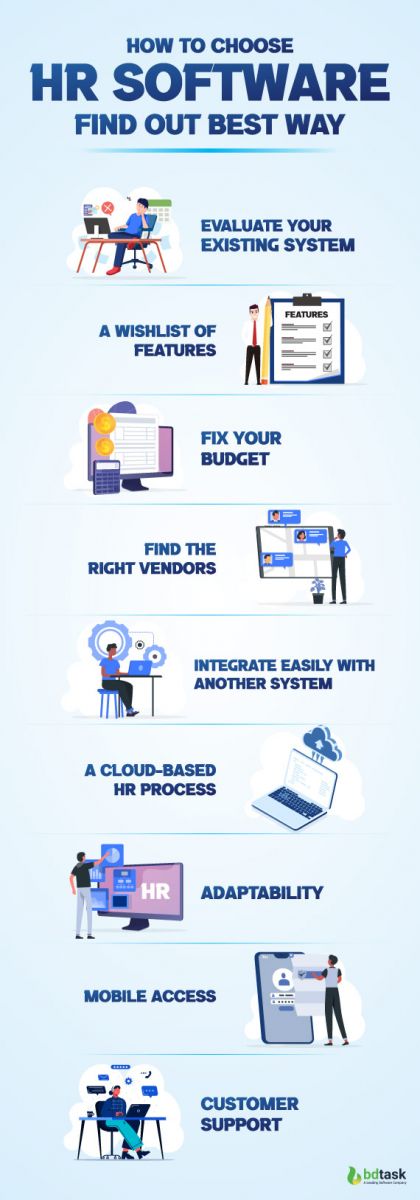
Choosing the right HR software requires understanding cost structures. Different software has various pricing models. Some charge a monthly fee. Others may have a one-time payment. Look for options that fit your budget.
Calculating ROI is important. Think about the money saved over time. Will the software make work easier? Will it help avoid mistakes? These factors matter. A good software can save time and effort.
| Cost Structure | Description |
|---|---|
| Monthly Subscription | Pay each month for use. |
| One-Time Purchase | Pay once for lifetime access. |
| Freemium Model | Basic features for free; pay for upgrades. |
Evaluating Software Usability

Usability is important when choosing HR software. A good user interface makes it easy to use. Look for clear buttons and simple menus. Users should find what they need quickly.
Experience matters too. Software should be smooth and not confusing. Users should feel comfortable using it right away.
Accessibility is key. Check if the software works on different devices. It should be easy to use on phones and tablets. This makes it better for everyone.
Mobile compatibility helps users stay connected. They can access important info anytime, anywhere. This leads to better communication and efficiency.
Security And Compliance
Choosing the right HR software needs strong security and compliance. Protecting data is very important. Look for encryption to keep information safe. Regular backups help prevent data loss. Check if the software uses firewalls and anti-virus tools.
Regulatory compliance is also key. Different regions have different rules. Make sure the software meets local laws. This includes data privacy laws and employment regulations. Ask if the provider has certifications. These show that they follow the right standards.
| Data Protection Measures | Regulatory Compliance Requirements |
|---|---|
| Encryption | Local Laws |
| Regular Backups | Data Privacy Laws |
| Firewalls | Employment Regulations |
| Anti-virus Tools | Certifications |
Vendor Selection And Comparisons
Researching vendors is key. Start by checking online reviews. Ask for recommendations from trusted sources. Make a list of vendors that fit your needs.
Next, compare their features. Look for software that meets your specific goals. Check if they offer a free trial. This can help you test the software.
Assess vendor support and service quality. Good support is essential. Check if they have a responsive help team. Look at their support hours. Make sure they are available when you need them.
Read their service agreements carefully. Understand the terms before choosing a vendor. This helps avoid surprises later.
Trials And Demos
Free trials help you see how HR software works. Take time to explore all the features. Invite team members to join you. Their feedback is very important.
Gather thoughts from everyone. Ask questions to understand how they feel. Use a simple form to collect ideas. Write down what they like and dislike.
Discuss the findings together. It helps to make the right choice. Remember, the goal is to find the best fit for your team.
Making The Final Decision
Gather feedback from your team. This helps in making a better choice. Talk to different departments. Each team has unique needs.
Use surveys or meetings. Ask simple questions. Find out what features they want. Look for patterns in their answers. This will guide your selection.
Next, focus on contracts and terms. Read everything carefully. Make sure you understand all details. Check for hidden fees or costs.
Negotiate for better rates. Speak with the vendor. Ask for discounts or flexible terms. This can save money in the long run.
Ensure the support offered is good. Know how to reach help if needed. Clear terms lead to a better experience.
Implementation And Onboarding

Planning the rollout is a key step. Start with a clear plan. Set clear goals for what you want to achieve. Choose a small group to test the software first. This helps find problems early. Get feedback from these users. Adjust the plan based on their comments.
Training staff is very important. Offer easy-to-follow training sessions. Use simple guides or videos. Make sure everyone understands how to use the software. Encourage questions and support. This helps build confidence.
Encourage staff to use the software daily. Create a friendly environment. Recognize those who use it well. This makes others want to join in. Monitor usage and offer help when needed. Keep the lines of communication open.
Future-proofing Your Hr Software Investment
Choosing the right HR software is important. Look for scalability. It should grow with your company. A good system can handle more users and data.
Flexibility matters too. The software should adapt to your needs. Custom features can help. Think about your future needs.
Keeping up with technology is essential. Software updates should be easy. Check if the system uses the latest tools. This ensures you stay competitive.
Don’t forget about user support. Help should be available when needed. Good support makes using the software easier.
Credit: www.bdtask.com
Frequently Asked Questions
What Features Should I Look For In Hr Software?
When choosing HR software, consider features like employee management, payroll processing, recruitment tools, and performance tracking. Additionally, look for integrations with existing systems and user-friendly interfaces. Customization options and mobile accessibility are also essential for enhancing user experience and streamlining HR processes.
How Much Does Hr Software Typically Cost?
The cost of HR software varies widely based on features and user count. Basic systems can start around $10 per employee monthly. More comprehensive solutions may range from $50 to $200 per employee monthly. Always evaluate the value offered to ensure it fits your budget and business needs.
Is Hr Software Suitable For Small Businesses?
Yes, HR software is highly suitable for small businesses. It can streamline processes and save valuable time. Many solutions are designed specifically for smaller companies, offering scalable features at affordable prices. Implementing HR software can improve efficiency and support growth as your business expands.
How Do I Choose The Right Hr Software?
To choose the right HR software, assess your specific needs first. Consider factors like company size, budget, and required features. Research different vendors and read user reviews to compare options. Request demos to see how the software functions and ensure it aligns with your business objectives.
Conclusion
Choosing the right HR software is key for your business. Focus on your needs first. Think about budget, features, and ease of use. Take time to compare different options. Read reviews and ask for demos. This helps you see how each software works.
Making a thoughtful choice saves time and improves efficiency. Your team will benefit from the right tools. Start your search today and find the perfect fit for your organization. A good decision leads to better HR management and happier employees.


